
If you own or are planning to register a .au domain, such as .com.au, .net.au, or .au direct, you might be wondering how to protect your personal details from showing up in public WHOIS records.
For many domain extensions (like .com or .net), registrars offer WHOIS privacy, also known as domain privacy protection, to hide registrant information behind anonymised details. However, this is not available for .au domains.
This guide explains why, what privacy protections are provided by default, and what steps you can take to enhance your privacy further.
Why doesn't .au allow WHOIS privacy services?
auDA, the Australian domain authority, regulates the .au namespace. Under auDA's rules, registrars are not allowed to offer privacy or proxy registration services for .au domains.
This policy exists to maintain transparency and accountability within Australia's domain name system, making sure businesses and individuals can be identified if necessary for legal, consumer protection, or security reasons.
That's why you cannot set up domain privacy for a .au domain the way you might for a .com or .org — not with GoHosting, nor with any other registrar.
What personal details are shown on .au WHOIS?
That said, auDA has taken steps to limit what's publicly visible, largely influenced by Australia’s Privacy Act 1988. Unlike older WHOIS systems, the .au WHOIS:
Does not show street addresses, phone numbers, or fax numbers.
Shows the registrant’s name, which can be a business name or an individual name, depending on registration.
Shows the registrant's email address.
For businesses, shows eligibility type and ID (e.g., ABN, ACN, trademark number).
Makes domain lookup available only via the web, not through automated systems (Port 43), which helps limit bulk scraping of WHOIS data by bots.
So, while WHOIS privacy services aren't available, your most sensitive contact details are already hidden by default. auDA’s policies aim to balance transparency with privacy protections under Australian law.
How can you improve your privacy on a .au domain?
Even without privacy add-ons, you can take some practical steps to reduce personal exposure:
Use a generic contact name: Instead of a personal name (e.g., “John Smith”), use a role-based title like “Domain Manager” or the organisation’s name.
Use a business or role-based email: Provide a neutral email address (e.g., [email protected]) rather than a personal one, as long as it’s a valid contact point.
Use a business address: Register the domain with a business or registered office address instead of a personal home address to reduce exposure.
Use a business or virtual phone number: If possible, avoid listing a personal phone number; a business line or virtual number is preferable.
Again, your street address, phone number, or fax number won’t appear publicly, but it’s still wise to keep personal and business contact details separate in all official records.
Important: The details you provide must be legitimate, reachable points of contact. Providing false or misleading information can breach auDA rules and risk domain suspension.
How to change your .au domain contact details
If your domain is registered with GoHosting, you can easily update details like email addresses, phone numbers, and postal addresses for the registrant, admin, billing, or tech contacts at any time. Here’s how:
Go to www.gohosting.com.au and log in to your account.
Click "Domains" in the top menu, then select "My Domains".
Tick the box next to the domain you want to modify, then click "Edit Contact Information".
Update the contact details as needed.
Click "Save Changes".
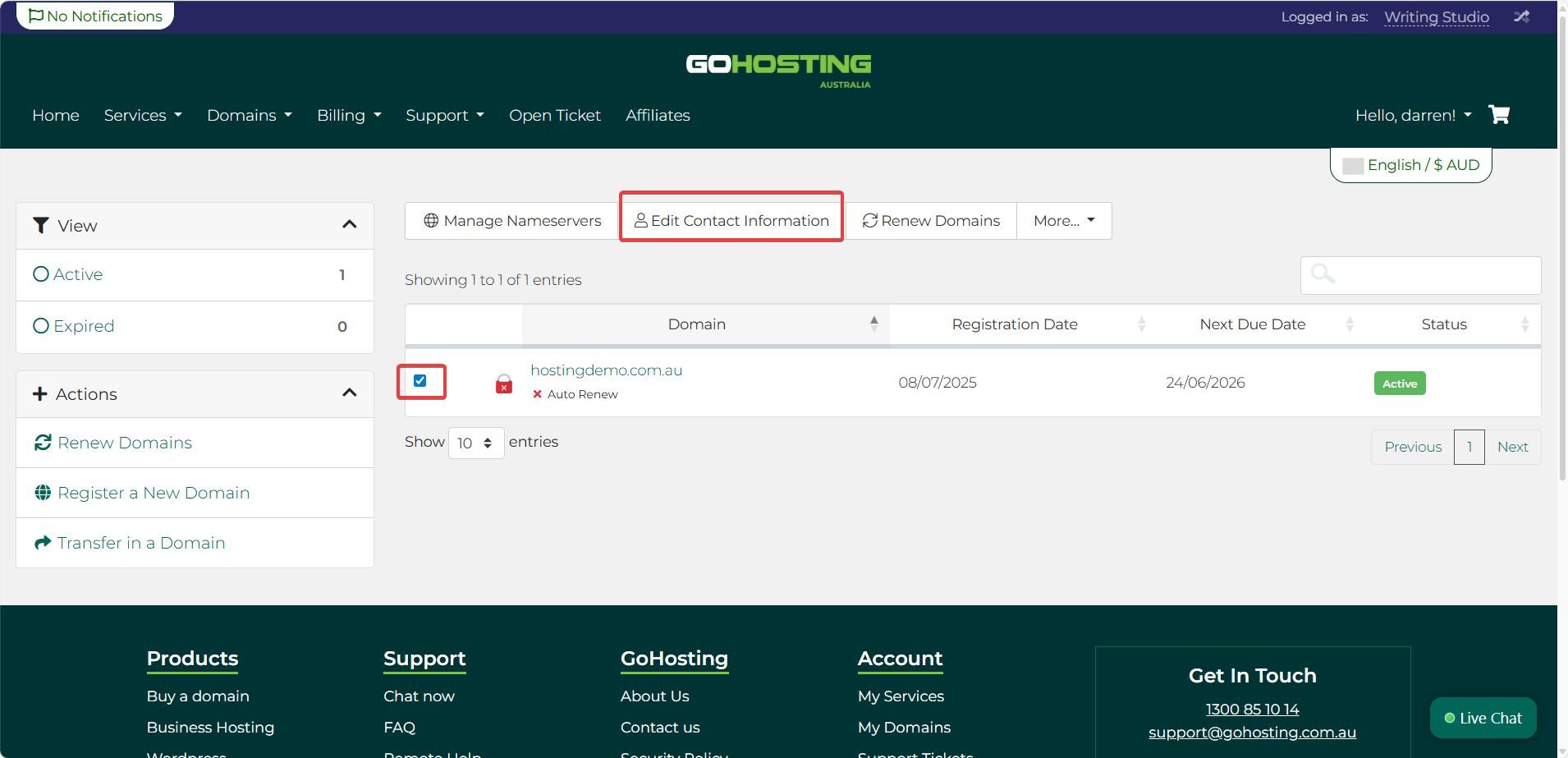
After you make changes, we may send confirmation emails to the old and/or new email addresses. You may also need to log in with two-factor authentication (2FA) to confirm the updates.
How to check your current WHOIS details
You can check which of your personal details are visible by using auDA’s official WHOIS lookup tool. This tool helps you confirm that no unintended personal information is exposed and allows you to verify updates after making changes to your domain’s contact details through GoHosting.
Simply enter your domain name and click "Look It Up".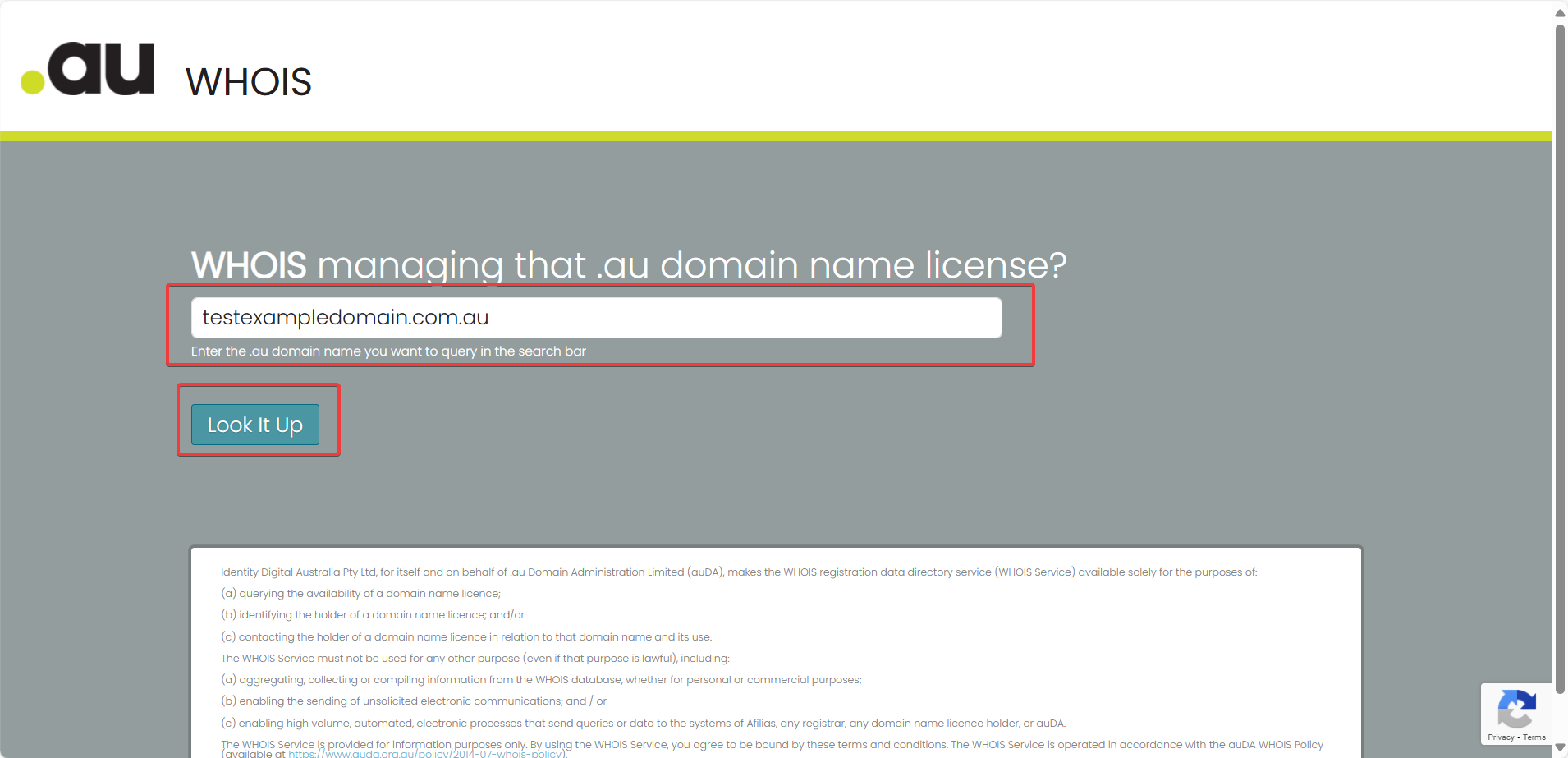
How to set up domain privacy on other domains
Setting up WHOIS privacy is simple for many generic top-level domains (gTLDs), including:
.com, .net, .org, .info, .biz, .co, .site, and .me.
It typically involves checking a box and paying a small fee. We show you how to do it step-by-step with GoHosting in the following guide:
How to set up domain privacy for your domain
